How to Change Avatar Icon in Xender – Complete Guide 2026
Changing your Xender avatar is more than just a cosmetic tweak—it makes file sharing faster and more personal. A recognizable avatar helps others quickly identify your device in crowded transfer sessions. In this guide, you’ll learn exactly how to change your avatar icon in Xender with clear steps, tips, and answers to common questions.
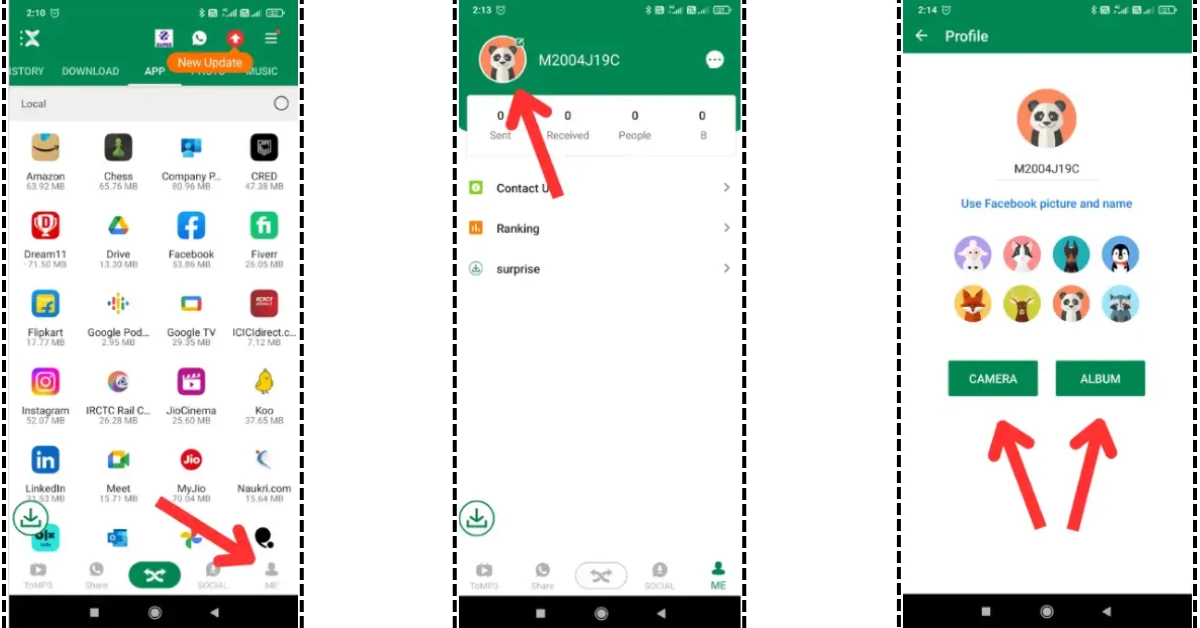
Quick Answer: To change your avatar icon in Xender, open the app, tap your current avatar in the top-left corner, select the avatar next to your device name, choose from a pre-made icon, take a new photo, or pick one from your gallery, crop if necessary, then save to update.
Step-by-Step Guide to Changing Your Xender Avatar Icon
- Open the Xender App – Launch the Xender app on your Android or iOS device.
- Tap Your Current Avatar – In the top-left corner, tap your existing avatar or default icon to open the profile menu.
- Access Avatar Options – Tap the avatar next to your device name to open customization settings.
- Choose Your New Avatar – Select a cartoon icon, take a new photo, or choose an image from your gallery.
- Adjust & Crop – Use the cropping tool to center and refine your image.
- Save Changes – Tap Save or the checkmark icon to apply the new avatar.
Why Change Your Avatar in Xender?
- Better Recognition – Stand out in busy file-sharing environments.
- Personal Branding – Add a professional or fun touch to your profile.
- Easier Connections – Friends can find your device faster.
Pro Tips for a Great Xender Avatar
- Use a high-quality, clear image.
- Choose high-contrast colors for visibility.
- Keep it professional if using in work settings.
Frequently Asked Questions
Can I set my own photo as a Xender avatar?
Yes. Select “Gallery” when changing your avatar to upload a custom photo.
Can I change my avatar in Xender Web or PC version?
No. Avatar customization is currently only available on Android and iOS apps.
Does changing my avatar affect file transfer speed?
No. It only changes your profile’s appearance.
Can I remove my avatar and go back to default?
Yes. You can reselect the default avatar anytime from the customization screen.
What’s the recommended image size for Xender avatars?
Use a square image (1:1 ratio) at least 400×400 pixels for best results.
You may also like: